Domain Backlink Score
A single composite 0-100 score for your entire backlink profile, plus an embeddable SVG badge you can show off on your site.
The Domain Backlink Score is one number that summarizes your entire profile. Think of it as Lighthouse for backlinks: a single composite 0-100 with a letter grade, broken down by Quality, Diversity, and Toxicity.
How it's calculated
Score = round(
  Quality * 0.50      // average AI score across monitored + valuable discovered links
  + Diversity * 0.25   // unique source domains and TLD spread
  - Toxicity * 0.25    // toxic_count / total_count, scaled
)
A breakdown:
| Component | Weight | Range | What it measures |
|---|---|---|---|
| Quality | 50% | 0-100 | Average DeepSeek score across your monitored + audit-discovered links above the 30 threshold. |
| Diversity | 25% | 0-100 | Unique source domains scored against a logarithmic curve (50 → 50 pts, 200 → 80 pts, 1000+ → 100 pts). Plus TLD spread bonus. |
| Toxicity penalty | 25% | 0-100 | Subtracts: ratio of is_toxic = true links across your tracked profile. |
Letter grade:
| Grade | Score |
|---|---|
| A | 85-100 |
| B | 70-84 |
| C | 55-69 |
| D | 40-54 |
| F | 0-39 |
A new account starts at "—" (no data). Run an audit and add links to monitoring to populate the score.
The Score page
Click Score in the sidebar.
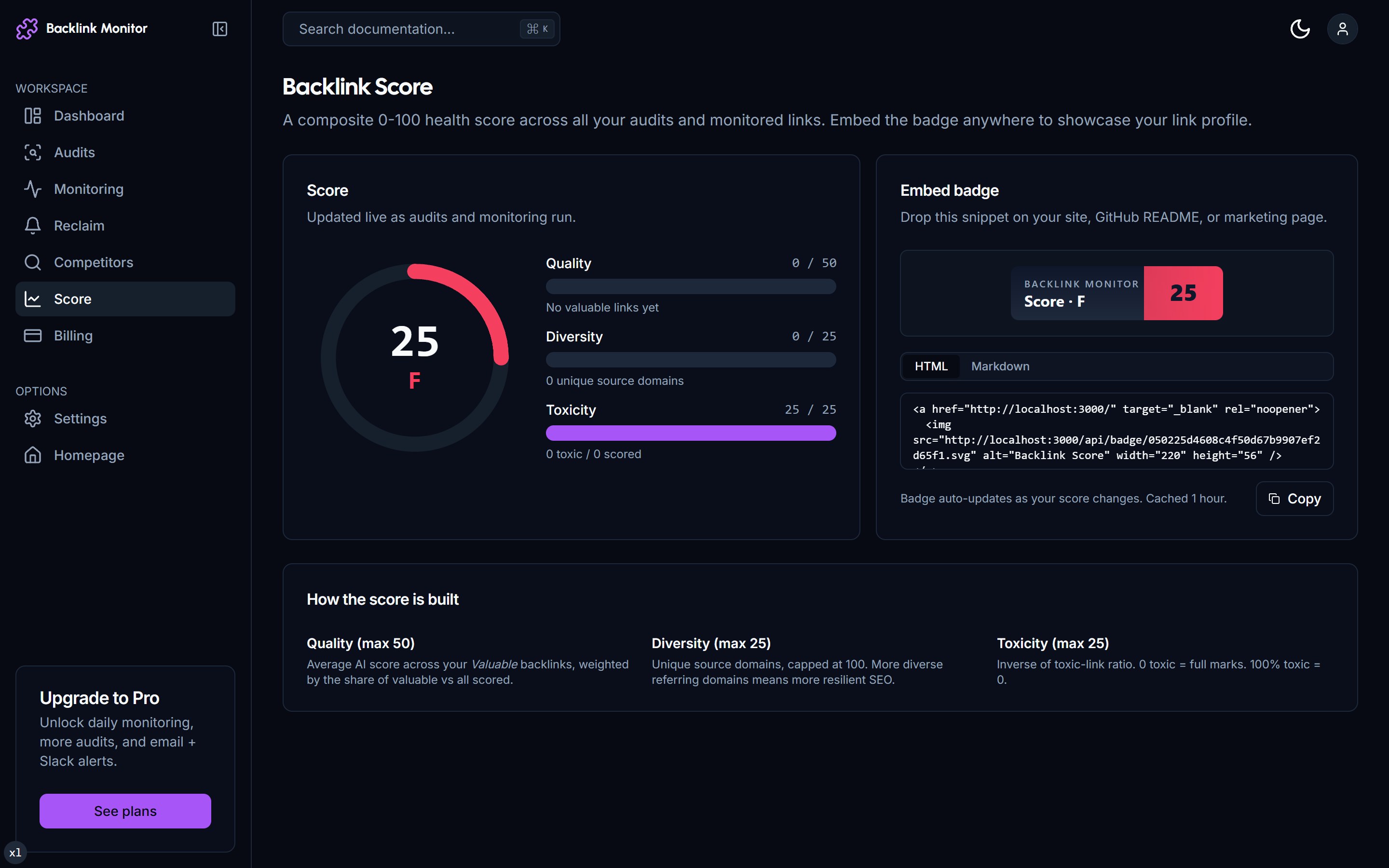
The page has four sections:
Top - the score itself
Big circular visualization with the number, letter grade, and a one-line interpretation ("Strong profile - keep monitoring"). Below it: trend sparkline showing how the score has moved over the past 90 days.
Breakdown cards
Three cards corresponding to Quality, Diversity, Toxicity. Each shows:
- The component score.
- A short explanation of what's holding it up or pulling it down.
- A "How to improve" link going to the relevant workflow.
For example, the Diversity card might read: "You have 47 unique source domains across 12 TLDs. Add more domain variety to reach 80+ diversity. [Run gap analysis →]"
Top contributors
The 5 highest-scoring monitored links. These are your "hero" backlinks - if any of them die, your score drops noticeably.
Embed badge
At the bottom: the SVG embed snippet.
Embeddable SVG badge
You can publicly display your Backlink Score on your own site, blog, or footer with an SVG badge. The snippet:
<a href="https://backlinkmonitor.com/r/u_abc123xyz">
  <img
    src="https://backlinkmonitor.com/api/badge/u_abc123xyz.svg"
    alt="TraceLinker Score"
    width="200" height="40"
  />
</a>The token (u_abc123xyz) is unique to your account. The SVG is regenerated on every request from a 1-hour cache, so when your score changes the badge updates within the hour.
📸 Example of the embedded score badge in a website footer
The badge style matches the brand gradient: violet on dark, with the score number prominent and "TraceLinker Score" text alongside.
Use cases for the badge
- Trust signal in your site footer - shows visitors you take backlink quality seriously.
- Pitch material - "we score 87/A on TraceLinker" is a credibility line in outreach emails.
- Agency client deliverable - embed clients' scores on their dashboards (Agency tier has white-label badge variants).
Customizing the badge (Agency)
Agency users can:
- Set a custom badge label (e.g. "Site Authority Score" instead of "TraceLinker Score").
- Match brand colors instead of the default violet gradient.
- Use a horizontal or vertical layout.
All in Settings → Branding with a live preview.
Score thresholds and meaning
In our experience across thousands of backlink profiles:
| Score range | What it usually means |
|---|---|
| 90-100 | Top 5% of profiles. Long-running site with high-quality, diverse, clean backlinks. |
| 75-89 | Above-average profile. A real growth engine, monitored well. |
| 60-74 | Healthy but ordinary profile. Most growing SaaS sites land here. |
| 45-59 | Mediocre. Either too small a backlink count or some toxicity dragging things down. |
| 30-44 | Weak. Often: tiny profile under 20 links, or a profile dominated by low-DR comment-spam links. |
| Below 30 | Concerning. Suggests negative-SEO impact or a very young site. |
Don't obsess over the number. The breakdown cards tell you what to actually work on.
Caveats
The score uses only what you've audited or monitored. We don't have a view into backlinks you haven't told us about. If you've never run a comprehensive audit, your score reflects partial data.
Run a full audit (CSV export from Ahrefs or full GSC import) to populate the score across your real profile. For a brand-new account, the first audit is the most important.
Score history
Pro and Agency users get a 12-month history of the score, viewable as a chart. This is useful for:
- Showing clients improvement over time.
- Spotting a drop and correlating it with a Google update or a transition event.
- Justifying retainer renewals: "Score went from 62 to 81 over the last 6 months."
📸 Score history chart over 6 months
The chart annotates major events (large transitions, new audits) so you can see what caused movement.
How often the score updates
- Quality and Diversity recalculate nightly across your entire tracked profile.
- Toxicity recalculates on every audit completion and every transition event.
- The badge SVG cache busts hourly, so a fresh badge image reflects the current calc within 1 hour.
Troubleshooting
My score is "—". You don't have enough data yet. Run an audit covering at least 20 links and try again.
My score dropped a lot overnight. Either a big transition (multiple monitored links went dead), or a fresh audit added a batch of toxic-flagged rows. Check the dashboard alerts to see what happened.
Two of my domains have the same score. The score is calculated per workspace, not per target domain. If you track two domains in one account, they share a score. To track separately, use two accounts (or contact us about multi-domain Agency plans).
The badge image is not loading on my site.
The SVG endpoint requires the badge token in the URL. If you copied the snippet but the token looks generic (u_xxxx), regenerate it from the Score page. Also check your Content Security Policy: img-src must include backlinkmonitor.com.
Next
- Run a Backlink Audit - populate the data the score depends on.
- Set Up Monitoring - keep the data fresh.
- Disavow Toxic Links - improve the toxicity component.